
How SecBrain actually works.
Three short sections on where your data sits, where the AI runs, and what happens when the network drops. The diagram is the simple kind.
Sync lives in the cloud. Search and editing live on your device.
Most knowledge tools treat their server as the brain. SecBrain doesn’t. The model is simple:
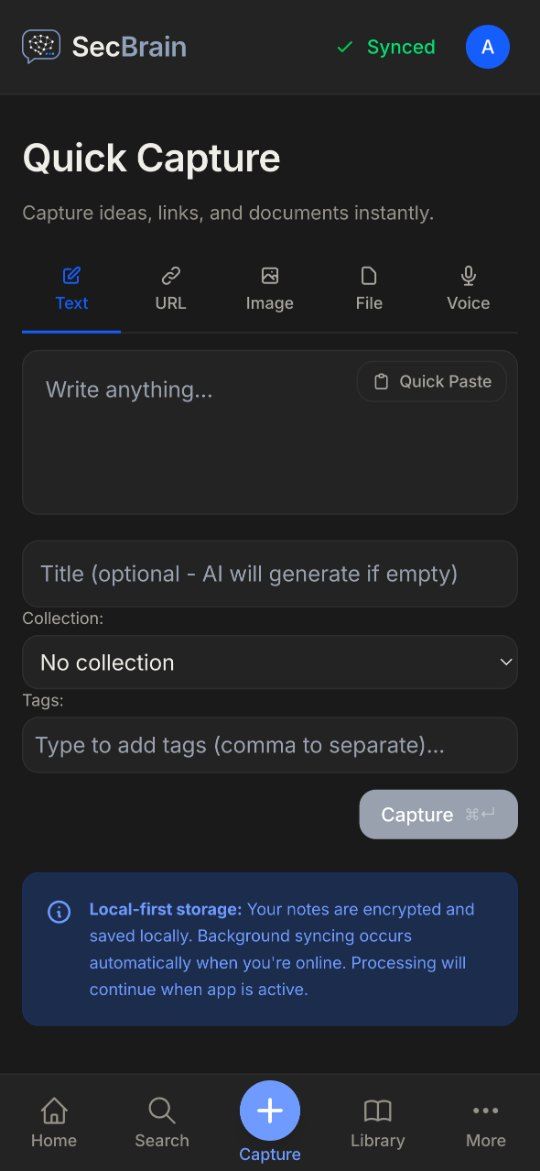
Your device holds a full, fast copy of everything. On web and desktop, that’s IndexedDB, with a local full-text index. On iOS, it’s GRDB, a Swift-native SQLite wrapper with FTS5 full-text search. The cloud (Postgres) is the source of truth in the boring sense: it’s how your devices stay in sync. The searching and the editing happen on your device.
Sync is near real-time: changes go up over HTTPS, and your other devices hear about them over WebSocket. When you write, the change goes into a bounded queue (500 operations or 5 MB, whichever first). The queue replays in the background, one operation at a time, persists to IndexedDB so it survives a crash, and resolves conflicts server-wins by version number. When the server’s copy wins, your local version goes to a 30-day archive you can recover it from.
Cloud AI, through our server.
Most knowledge tools don’t tell you where your prompts go. SecBrain says where they go.
AI operations (generating titles, tags and summaries; producing embeddings for semantic search; reading screenshots; suggesting links between memos) go from your device to our server, which calls a cloud provider and returns the result. That’s why they work with no setup.
Cloud AI runs on SecBrain’s own accounts with Anthropic (Claude), OpenAI and Google (Gemini), within your plan’s limits; you can’t add your own API key. When an AI feature runs, including the automatic summaries, tags and titles for captured items, image descriptions and email recap digests, the content it needs (memo text, captured page text or the image) goes through our server to the provider. Our usage log records token counts, not the text.
There is nothing to install and no key to manage. Your plan sets a daily and monthly AI allowance, and every app, emailed capture, recap digest and the Chrome extension’s chat takes the same path through our server. Embeddings for semantic search always use Google’s model.
Capture on a plane. Sync when you land.
You’re on a plane. You read a long PDF. You highlight three passages, type a memo, and add two tags. None of this depends on the cloud.
The PDF was extracted locally by pdf.js (web) or PDFKit (iOS). The tags went into the local database. The capture queued for sync; the queue persisted to IndexedDB so a hard reset doesn’t lose it.
When the plane lands, the queue replays and the AI summary runs. Conflicts (rare in single-user use) are resolved server-wins. Your other devices catch up when they next connect.
That is how the product works today.
Software for thinking should say where the thinking happens. We built SecBrain to be used for ten years: boring where it can be, and clear about the parts that are still moving.